Nazim ERP العربية Sign in Start the trial Open Nazim

Your whole company in one system

Sales, inventory, purchasing, accounts and payroll work together. You enter a transaction once and find it wherever it should be.

14 days, with no bank card. See how it works

Good morning, FaisalTuesday 24 November 2026
Cash and banks184,320.00 SARThree cash boxes and two bank accounts
Sales today23,410.50up to 10:41 am
Customer receivables61,750.006 invoices overdue
Sales today by branch
Olaya9,840.00
Malaz7,215.50
Jeddah, Tahlia6,355.00

Try it: press Approve

Yesterday by the same hour: 21,940.00
Waiting for your decision3
  • Purchase request: 60 bags of ricefrom the Malaz storekeeper
  • Stock adjustment, Jeddah branch6 cartons of water short in the count
  • November payroll23 employees
Stock value412,870.007 items under the reorder level
Supplier bills due this week38,640.003 bills
VAT return47,745.00fourth quarter, whole company

The company’s cash right now, without asking anyone

A sale just came in. Follow it below

An interactive demo with sample data. Drag the window by its bar; double-click to put it back.

Every department of your company is here

Open any of them to see what is inside. You subscribe to what you need today, and the rest is ready when you need it.

All of it opens for you in one trial.14 days, with no bank cardStart the free trial

One sale, and five things happen by themselves

At 10:42 the Olaya branch sold three bags of rice. Nobody entered anything after that. Follow what the system did.

  1. 1

    The warehouse balance goes down

    The Olaya warehouse had 42 bags and now has 39. Whoever opens the stock levels sees the new number.

    InventoryStock levels
    ItemWarehouseOn hand
    Basmati rice 5 kgOlaya42→39
    MoveSales issue10:42−3
  2. 2

    The cost of what was sold is worked out

    At weighted average: SAR 38.40 a bag after the last receipt. So this sale cost 115.20, a figure and not an estimate.

    InventoryCosting
    38.40 × 3 = 115.20weighted average
  3. 3

    The journal entry is posted

    When the shift closes a balanced entry is posted: cash, sales, VAT and cost of goods sold.

    AccountingJournal entry
    AccountDebitCredit
    1111Cash172.50
    4110Sales of goods150.00
    2131VAT payable22.50
    5110Cost of goods sold115.20
    1141Inventory115.20
    Balanced287.70287.70
  4. 4

    The VAT joins the return

    SAR 22.50 was added to output VAT in the quarter’s return. When it is due, it is ready.

    AccountingVAT return, fourth quarter
    LineAmountVAT
    Standard-rated sales318,450.0047,767.50
    Of which this sale+150.00+22.50
  5. 5

    The profit shows

    Sales in the income statement rose by 150.00 and their cost by 115.20. This sale earned SAR 34.80, and you see it today, not at month end.

    AccountingIncome statement
    4110Sales of goods+150.00
    5110Cost of goods sold−115.20
    Gross profit34.80

One entry. No export, no copying, no reconciling at month end.

Enter an item, sell it, and follow its trail yourself.14 days, with no bank cardStart the free trial

No bill is paid for goods that did not arrive

The storekeeper asked for 120 cartons and the finance manager approved. 100 arrived, then the supplier’s bill came for 120. The system refuses to post it until the receipt is complete or someone with the authority approves the difference.

Price lists and payment terms
Each supplier has prices per purchase unit, and terms that set the due date at posting.
Returns and debit notes
Goods go back, and the supplier balance and the stock change together.
Supplier statement
And aging per branch, tied to the payables account.
Purchase analysis
What you bought, from whom and for how much, to Excel and PDF.

Orders, receipts and the match are in the Merchant and Enterprise plans; purchase requests and their approval are in the Enterprise plan.
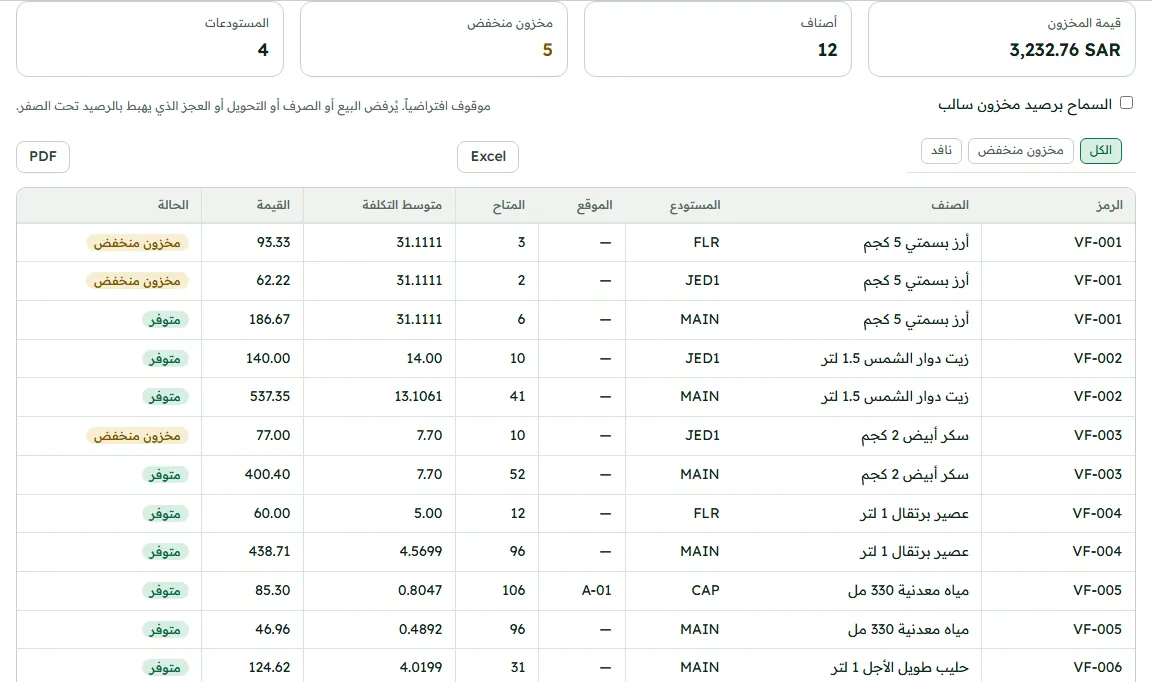
The stock levels screen: stock value, low items, and each item per warehouse at average cost

The system warns you and suggests the quantity

Know what you have, where it is, and what it cost

You moved twenty cartons from the Riyadh warehouse to the Jeddah branch. The balance fell here and rose there at the same moment, and their cost moved with them.

Branches and warehouses
A balance per warehouse, with bins inside it (in the Enterprise plan).
Transfers
Between warehouses and branches, in one document.
Stock counts
Cycle or blind, from a phone, with a recount beyond tolerance.
Reorder level
Per item per warehouse, and from it a draft purchase request.
Weighted average
A cost that updates with every receipt.
Freight and customs
Loaded onto the item cost, not onto expenses. Available in the Enterprise plan.

Close the month with a checklist, not a guess

Before the close the system checks nine points: documents not posted, shifts still open, VAT that does not agree with the books, stock that does not agree with the ledger. What is not done is shown by name, so you know what is left.

Entries that post themselves
From invoices, the till, purchasing and payroll.
Bank reconciliation
You import the bank statement; the system pairs each line with its equal entry, and you match what is left.
VAT return
From the same entries, reconciled to the books.
Aging
For customers and suppliers, with a statement for each.
Financial statements
Income statement, balance sheet, trial balance and ledger.
Zakat
A worksheet that builds the base from your balances.
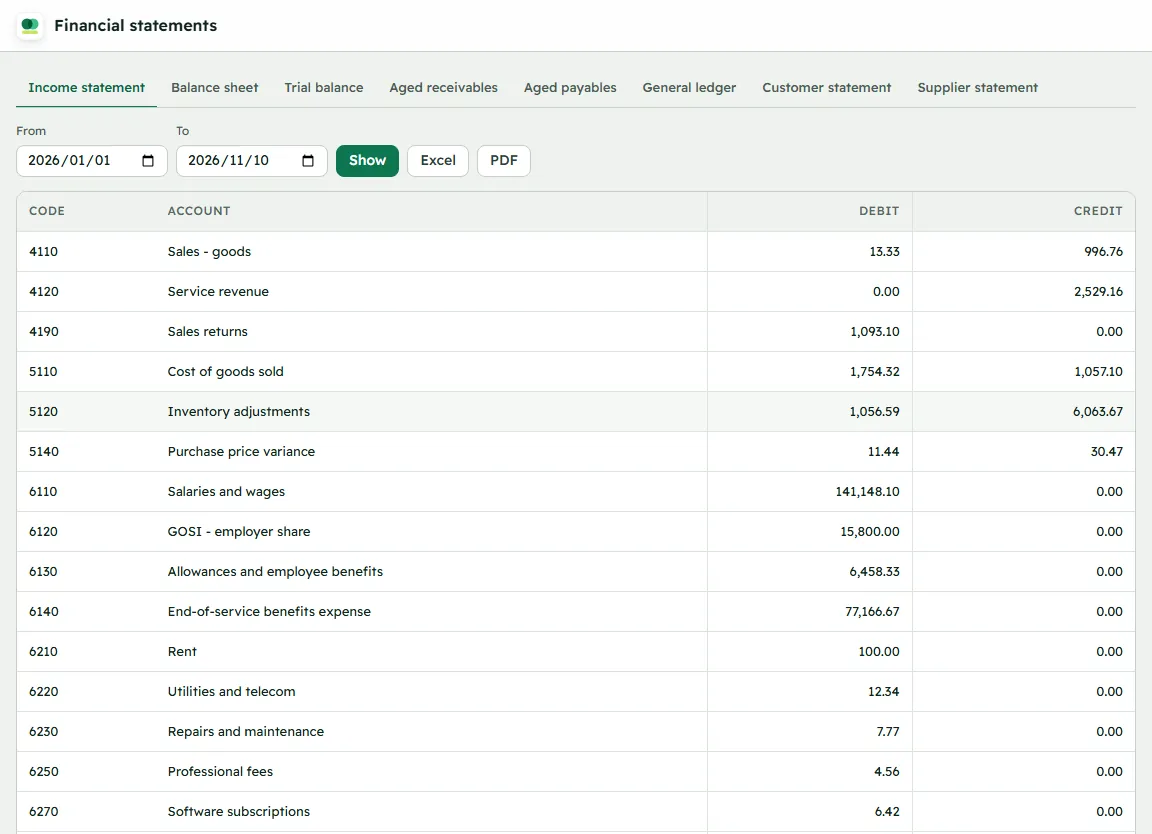
The income statement in the accounting app: accounts with debit and credit, and export to Excel and PDF

From the fingerprint to the bank file without one spreadsheet

Sultan clocked in twenty-two days in November and was late once. At month end his salary was calculated, his GOSI deducted, and his name landed in the wage protection file that goes to the bank. Nobody opened a spreadsheet.

Leave balances
From a ledger per employee, not from anyone’s memory.
End-of-service dues
Calculated from the length of service and the last wage.
Career decisions
Hiring, promotion and transfer, with their effective dates.
Payslips
Per employee, or the whole run in one file.

The link with fingerprint devices (ZKTeco, Suprema, Hikvision and Anviz) and the bank files is ready, and we try it with your device and your bank before you rely on it.

Every decision has an owner, every change leaves a trace

An employee changed an item price on Thursday. A month later you ask: who, when, and what was it before? The answer is in the log, by name and by the minute.

Approval paths you design
For purchase requests, stock adjustments, leave and the payroll run.
One inbox
Everything waiting for your decision in one place, with delegation when you are away.
Permissions by branch and role
Each role gets only what it needs, and a branch accountant does not see another branch.
Audit log
For every posting and every change: who, when, and what it was before.

Point of sale and e-invoicing

A point of sale that keeps selling when the internet drops

The Windows till keeps the sales on the device and prints the receipt with its QR code. When the connection returns they move to the system by themselves, with their stock and their entries.

E-invoicing to the requirements of ZATCA

Tax and simplified invoices and credit and debit notes, with a signed XML file, a QR code and an unbroken counter, as phase two requires. You try it in the simulation environment, then link your business.

You have seen what it does. Try it on your company’s data.14 days, with no bank cardStart the free trial

At eight in the morning, what does each person find?

It is the same system, and each employee sees only their own work in it.

  • The owneropens “My day”

    He sees the company’s cash and the branches’ sales, and three requests waiting for his signature. He approves them from his phone before he reaches the office.

  • The accountantopens Accounting

    Yesterday’s entries are already posted. He reconciles the bank statement, reviews the overdue invoices, and takes the trial balance without asking anyone for a file.

    The income statement in the accounting app: accounts with debit and credit, and export to Excel and PDF
  • The buyeropens Purchasing

    He sees the items that fell under their reorder level, turns them into a purchase request, and follows which of the week’s orders arrived and which are late.

  • The storekeeperopens Inventory

    He receives the shipment against its purchase order and prints its labels, then counts one shelf from his phone. The difference shows before it goes for approval.

    The stock levels screen: stock value, low items, and each item per warehouse at average cost
  • The HR officeropens HR

    He reviews the morning’s punches and two leave requests, and prepares the month’s payroll run for approval.

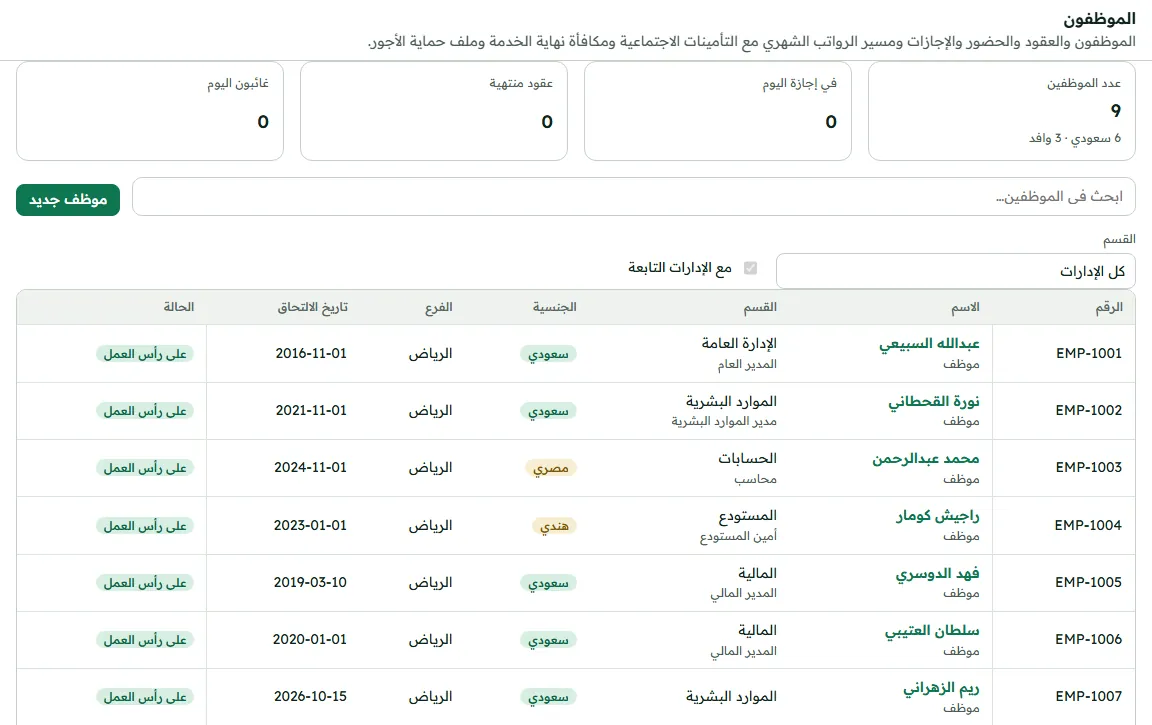
    The employee list in the HR app: number, department, branch, joining date and status
  • The cashieropens Point of sale

    He opens his shift by counting the cash and starts selling. At the end of the day he closes it, and the system tells him whether the drawer is over or short.

Three programs and a spreadsheet, or one system

Before

  • A program for the till
  • A program for the accounts
  • A program for payroll
  • A spreadsheet for stock
  • And re-entry at the end of every month

After

One entry that reaches every place

The sale updates the stock, the stock updates the accounts, and the accounts prepare the return. Nobody retypes a number someone else already typed.

One account for everything

You sign in once and open the site, the system, the till and your subscription page. From your account you change plan, add a user or a branch, and download your invoices.

One sign-in
  • This siteknows you and shows “Open Nazim”
  • Nazim on the weball your apps
  • The tillenrolled with the same account
  • My accountplan, invoices and devices

Questions asked before starting

Did not find yours? Write to us by email.

Is it an invoicing tool or an ERP?

A full ERP: sales and point of sale, inventory, purchasing, accounting, and HR and payroll, all on one database. You can start with invoicing and accounting alone and add the rest when you need it.

Do I need an accountant to run it?

No. The chart of accounts is ready on day one, and entries post themselves from sales, purchases and payroll. Your accountant finds what they need: journals, bank reconciliation, statements and period close.

Does it comply with e-invoicing?

The system is built to the phase two requirements (integration): a signed XML file, a QR code and an unbroken counter on every invoice. You try it in the simulation environment first, then link your business with the activation code from the Fatoora portal. The live link is available in every plan except Simple.

What if the internet drops in the shop?

The Windows till keeps selling, prints the receipt with its QR code and keeps the sales on the device. When the connection returns they move to the system by themselves. It is available in every plan except Simple.

How many branches and users can I add?

Each plan has its limits, from two users and one branch to fifty users and twenty branches. If you need more, you add a user, a branch or a till from your account without changing plan.

What happens after the fourteen days?

You choose a plan and pay, and your work continues without a break. If you do not, entry stops and your data stays, readable and exportable. Nothing is charged automatically.

How do I pay?

By bank transfer: you see the account details and an order reference, and we confirm within one working day. Card payment is coming soon. Every payment has a tax invoice in your account.

Can I take my data out?

Yes. Your data is yours: you export lists and reports to Excel and PDF whenever you like, and it is not deleted if your subscription stops.

Try it on your own data, then decide

14 days with no bank card. What you enter stays yours if you do not continue.

14 days, with no bank card. See the prices

Start the free trial